Most AI tools for teachers do one job. A chatbot drafts a lesson plan, a generator spits out a quiz, and then the teacher copies the result into a slide deck, a quiz app and a learning management system before a student ever sees it. Edcafe is built around skipping those steps. It turns a topic, notes or slides into an activity, hands it to students and shows the teacher what came back, all in one place.
It comes from Inknoe, the company behind ClassPoint, an interactive quiz add-in for PowerPoint (Edcafe; Inknoe). We read Edcafe's product, pricing and privacy pages on Nov. 12, 2026. Here is what it does, what it costs and what to check before students use it.
What Edcafe does
Edcafe describes itself as "an AI platform for interactive activities, made for teachers to use with their students" (Edcafe). Its homepage lists a dozen generators:
- Activities for students: quizzes built from "a topic, text, webpage, or document," quizzes built from YouTube videos, flashcards, reading activities and custom chatbots. Every plan also includes Mini Apps, which Edcafe's pricing page marks as new.
- Planning and content: a slide generator that builds a deck from a topic or file and exports it to PowerPoint, plus lesson plans, summary notes, teaching resources, AI images and AI speech.
- Grading: an assignment grader that gives "AI-assisted feedback on student submissions."
What sets it apart from a general chatbot is the second half of the loop. Students complete the activities and "get instant feedback while you watch their progress live," and every quiz, chatbot conversation and submission lands in one place. A dashboard shows "scores, participation, and trends," and Edcafe says student chatbot conversations "are monitored for signs of distress or concern and flagged when needed."
Activities can also launch from Canvas, Moodle or Blackboard, where "Students click and start—no extra logins," Edcafe says, though LMS integration is listed with the Premium and school plans. Its pages do not mention Google Classroom.
What it costs
Edcafe's free plan is unusually generous. It promises "Unlimited AI Generations," and Edcafe says the plan is "Free, and forever will be" (Edcafe pricing). The limits fall on the activities students use, not on generating content.
Plan | Price | Chatbots, Mini Apps and graders | Students per activity | Also includes |
|---|---|---|---|---|
Free | $0 | 3 of each | 40 | Unlimited AI generations, community library |
Pro | $7.99 a month, billed annually | 20 of each | 200 | Upload your own files as AI knowledge, export to other formats |
Premium | $14.99 a month, billed annually | Unlimited | 1,000 | School data privacy agreement, SOC 2 Type 2 report, LMS integration, training |
School | By quote | Not listed | Not listed | Enterprise security, LMS integration, priority support |
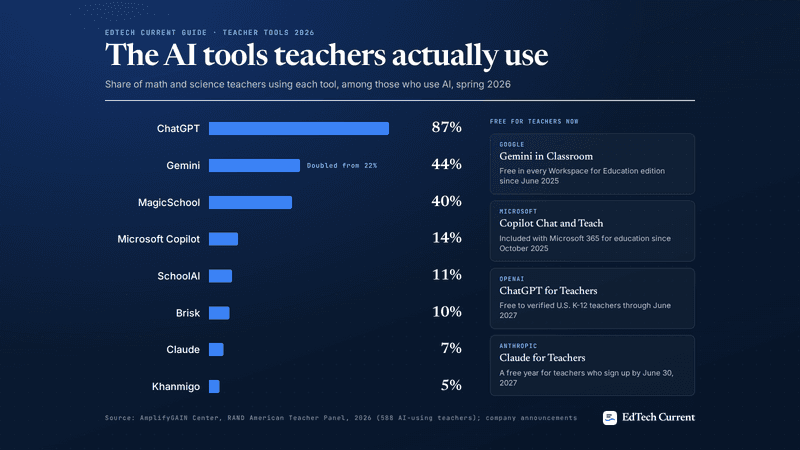
Billed annually, Pro comes to $95.88 a year and Premium to $179.88. With the code EDTECHCURRENT, Pro would be about $86.29 a year. For comparison, MagicSchool Plus is $99.96 a year, and SchoolAI's free plan is now a trial capped at five sessions a year (see our guide to AI tools for teachers).
Two things to note. The free plan's 40-student cap applies per activity, so it covers a single class but not a whole grade. And uploading your own files as knowledge for the AI is listed as a Pro feature.
Privacy and safety
Edcafe's privacy policy, last updated Sept. 2, 2026, answers the question many teachers ask first. "We DO NOT use any data or content you provide or create on Edcafe AI - including your prompts, text inputs, uploaded files, generated outputs, account information, or usage data - to train or improve any artificial intelligence models," it says (Edcafe privacy policy).
The policy also says Edcafe complies with FERPA and COPPA "when applicable to our relationship with schools and school districts," and that schools and districts consent on behalf of parents for students under 13. That is the standard arrangement for classroom tools, and it means the protections depend on your school having an agreement with the vendor. Edcafe lists a custom data privacy agreement for schools with its Premium plan.
Edcafe's homepage says the company is "SOC 2 certified" and follows "GDPR, FERPA, and COPPA standards." The annual SOC 2 Type 2 report is listed as a Premium and school-plan feature, so ask for it if your district needs it. Inknoe's trust center did not load for us.
What we could not verify
- No independent privacy rating. We found no Edcafe evaluation from the Common Sense Privacy Program, which rates many of the tools in our AI tools guide.
- No accessibility report. Edcafe's site does not link to an accessibility statement or VPAT. The AI speech tool is a feature, not an accessibility audit, so ask the vendor for a report against WCAG 2.2 AA.
- No outcome research. We found no independent study of Edcafe's effect on teacher time or student learning. That puts it in the same position as most teacher AI tools: no randomized trial has shown that a teacher-assistant product raises achievement.
- Thin outside reviews. Most reviews we found came from Edcafe's own blog or software-listing sites with few user ratings.
Who should try it
Edcafe is a good fit for a teacher who wants students to do something with AI-generated material, such as take a quiz, talk to a chatbot set up around a reading, or practice with flashcards, and wants the results gathered without exporting anything. The free plan is enough to test that with one class.
It is a weaker fit if your work happens inside Google Classroom, or if your district only allows tools with a signed privacy agreement and a published accessibility report. In that case, start with the district's approved list, or ask your technology office to request Edcafe's agreement and SOC 2 report.
As with any AI tool, read what it generates before students see it, set up chatbots with clear instructions, and keep identifiable student information out of any account your district has not approved.
Sources
- Edcafe - AI platform for interactive activities. Edcafe (2026)
- Pricing & Plans | Edcafe. Edcafe (2026)
- Privacy Policy | Edcafe. Edcafe (2026)
- About Edcafe. Edcafe (2026)
- Inknoe - Technology crafted for educators. Inknoe (2026)